Se dice que el Extensible Markup Language (XML), pronto sustituir� a HTML para muchas aplicaciones. En el cap�tulo anterior desarrollamos una clase para crear un JavaBean, en funcionamiento configurado desde el contenido de un fichero XML. En este capitulo vamos a desarrollar la inversa, es decir escribiremos una clase que escriba JavaBeans como ficheros XML, usando el mismo "dialecto" XML.
 �Allanar Estructuras de Objetos
En la mayor�a de los programas no triviales, se procesa la informaci�n usando estructuras de datos. En la programaci�n orientada a objetos, estas estructuras de datos se componen generalmente de objetos que contienen los datos de inter�s para la aplicaci�n. A menudo es deseable utilizar los datos en los objetos de la aplicaci�n en m�s de una sesi�n del trabajo. (S�lo prueba a imaginar un procesador de textos sin un comando Save: apaga tu ordenador, y todos tus documentos morir�an con el editor!) Persistencia es el t�rmino com�n para el modo en que un sistema de software hace que sus datos "sobrevivan" a la muerte de los procesos en los que se est� ejecutando, de modo que �l pueda vivir para ejecutarse otra vez otro d�a (o en otra m�quina).
La persistencia ha estado siempre alrededor de la programaci�n orientada a objetos -- por lo menos en la pr�ctica, no en nombre. Los ficheros del procesador de textos, la peticiones de datos a trav�s de una red, son ejemplos de persistencia. de hecho, la persistencia de los datos es la raz�n de todos los tipos de medios de datos que tenemos: de las antiguas tablillas de arcillas y los papiros , a las cintas de papel levemente m�s modernas, los carretes magn�ticos, y a las tarjetas de perforadas de anta�o, hasta los CD-ROMs y DVDs de hoy. La idea b�sica que hay detr�s de la persistencia es codificar una estructura de software l�gica en una secuencia de bytes (un proceso a veces llamado "aplanar") de una forma tal que la secuencia se pueda utilizar m�s adelante para reconstruir una estructura id�ntica.
�Objetos Persistentes
Cuando el sistema de dise�o orientado a objetos y la programaci�n comenzaron a aparecer en la escena, estuvo inmediatamente claro (para cualquier persona que conoc�a dichas cosas) que ser�a muy conveniente poder crear objetos persistentes. Un objeto que se ejecutaba dentro de un programa podr�a ser convertido a una serie de bytes, y despu�s ser salvado o transmitido, y esa serie de bytes podr�a ser utilizada m�s adelante y/o en otra parte para reconstruir el objeto. Esto es exactamente lo que lo hace la serializaci�n Java. La base de Java tiene un conjunto de m�todos incorporados (en el paquete java.io) que permite que un programador haga que un objeto se escriba a s� mismo en una secuencia de bytes, o leerse desde una secuencia de bytes. La persistencia en el contexto de los sistemas orientados a objetos com�nmente se llama persistencia de objetos; o, dicho de otra manera, los objetos que han "persistido" (observa que "persistir" se ha convertido repentinamente un verbo transitivo) se llaman "objetos persistentes".
Pr�cticamente todo sistema orientado a objetos tiene cierto mecanismo de persistencia de objetos, implicado generalmente en un formato de persistencia (la disposici�n de los bytes en la stream de datos) que es "est�ndar", por lo menos para esa aplicaci�n. Se dice que lo m�s agradable sobre los est�ndares es que haya tantos donde elegir, y los formatos de persistencia de objetos no son ninguna excepci�n. Echa una mirada en la lista de "filtros" de documentos en un procesador de textos comercial si no te lo crees: cada uno de esos filtros est� intentando convertir a partir desde un formato de persistencia propietario a el que se est� usado internamente en el procesador de textos. El mecanismo de serializaci�n de Java, de hecho, fue dise�ado (mediante el interface java.io.Externalizable) para permitir que un programador lea y escriba los formatos de persistencia de los objetos de otras aplicaciones.
�Un Est�ndar Est�ndar
�Qu� tiene todo esto que ver con XML y JavaBeans? Bien, en estas p�ginas de XML y JavaBeans, estamos utilizando XML como formato de persistencia para los componentes JavaBeans. Lo agradable sobre XML, creo, es que es un est�ndar verdadero, pues la explosi�n de inter�s en los productos disponibles para XML lo demuestra. El est�ndar actual XML se llama Extensible Markup Language (XML) 1.0 W3C Recommendation. Cualquier aplicaci�n que sea "compatible XML" (est� simplemente significa que la aplicaci�n puede leer y escribir sus objetos en XML) potencialmente podr� interoperar con otros sistemas m�s f�cilmente que antes de que XML estuviera disponible, porque todos los sistemas XML se adaptan el est�ndar (o no son compatibles con XML, por definici�n.)
Por ejemplo, un nuevo lenguaje de marcas personalizado llamado RDF, de "Resource Definition Framework" , se est� estandarizando actualmente. Podemos leer la especificaci�n RDF, que es un "dialecto" (t�cnicamente llamado una aplicaci�n) de XML que se est� definiendo para las descripciones generales de metadatos (datos sobre datos). Una vez que se estandardice este formato, toda aplicaci�n que utilice el est�ndar podr� manipular y utilizar datos y metadatos de otros sistemas obedientes, porque todas las aplicaciones har�n las mismas asunciones sobre lo que significan los datos.
Ahora, esto no significa necesariamente que toda aplicaci�n entender� siempre las etiquetas de marcas de todas las otras aplicaciones, como cualquier persona que intente escribir un navegador HTML-neutral puede decirnos. Siempre hay tensi�n entre la fabricaci�n de un sistema extensible por un lado, y el mantenimiento de la compatibilidad por el otro. Pero XML proporciona un terreno com�n para los desarrolladores de sistemas con la persistencia de la estructura de objetos y publicar los interfaces en sus sistemas. Los lenguajes de marcas personalizados est�n apareciendo ya para dominios de aplicaci�n tan variados como la qu�mica molecular, interfaces gr�ficos de usuario, y formularios comerciales. Cuando estos est�ndares lleguen a extenderse, la interoperation de los sistema llegar� a ser m�s f�cil para todos.
Observamos en el objeto Player de la p�gina anterior que lo que le�amos desde un fichero de XML no era simplemente un objeto. Era un �rbol: un objeto Player, que conten�a referencias a un objeto Statistics, y a un objeto PersonName. Que toda la estructura de datos fue codificada en XML, y XMLBeanReader pod�a crear la estructura correspondiente en memoria examinando la estructura del objeto del Modelo del Objeto del Documento (DOM) creada por el analizador de sintaxis XML. Y, recordamos que no necesitamos escribir ning�n c�digo para el analizador. Simplemente le dimos al analizador de sintaxis XML el nombre del fichero XML, y �ste devolvi� la estructura de datos entera que el fichero de XML representaba. No estaba mal para una l�nea de c�digo!!!
As� pues, XMLBeanReader nos da la capacidad de tomar una representaci�n "plana" de una estructura del objeto (es decir, un JavaBean y sus propiedades representados como un stream de texto que resulta que es XML) y de crear la estructura correspondiente en memoria. Ahora, echemos una mirada a XMLBeanReader, que puede aceptar casi cualquier ejemplar JavaBean y representarlo en nuestro dialecto XML.
�Caracter�sticas de XMLBeanWriter
Antes de que nos zambullamos en escribir una clase para convertir un JavaBean en XML, hay un problema que deseo clarificar. El formato determinado del fichero XML que estamos utilizando para nuestro XML JavaBeans no es XML gen�rico. Es una aplicaci�n de XML -- es decir, un dialecto XML que definimos nosotros mismos, simplemente cre�ndolo.
Nuestro peque�o lenguaje XML JavaBeans es tambi�n muy simple: un elemento <JavaBean> contiene un elemento <Properties>, que a su vez contiene varios elementos <Property>. Un elemento <Property> podr�a contener un elemento de texto, indicando el valor de la propiedad, o un elemento <JavaBean>, si el valor de la propiedad es un JavaBean. Este es nuestro lenguaje de marcas personalziado. Por eso no podemos usar (actualmente) XMLBeanReader para leer XML gen�rico. La entrada XML tiene que adaptarse al "peque�o lenguaje" que hemos definido.
Una clase que lee las propiedades de un JavaBean y escribe el JavaBean en un fichero necesita poder hacer varias cosas. Aqu� est�n las tareas que necesitamos realizar, junto con alguna expl�caci�n sobre c�mo necesitamos que se haga:
- Identificar la clase de un JavaBean.
La clase de un JavaBean se puede identificar simplemente llamando a m�todo getClass() del bean, que todo objeto Java debe tener. (Est� definida en java.lang.Object, de la que desciende todo objeto.) - Identificar los nombres de las propiedades del JavaBean, sus tipos y sus valores.
La obtenci�n de los nombres de las propiedades de un JavaBean, sus tipos y sus valores es bastante f�cil porque la mayor�a del trabajo viene con la distribuci�n b�sica de Java en la clase java.beans.Introspector y su subclase asociada java.beans.PropertyDescriptor. - Representar el valor de cada propiedad como XML.
La representaci�n de cada valor de propiedad como XML es un poco m�s dif�cil, porque todas las propiedades no se pueden representar como texto. Si una propiedad determinada no tiene ninguna representaci�n de texto, pero el valor de la propiedad es un JavaBean, despu�s podemos representar el valor de propiedad como un JavaBean codificado en XML. Este hecho indica que el c�digo que codifica un JavaBean como XML deber�a ser un m�todo independiente, para poderlo llamar recursivamente si el valor de una propiedad JavaBean es tambi�n un JavaBean. - Escribir el XML resultante en alg�n lugar.
El lugar m�s simple para escribir la salida XML ser�a un fichero, pero esa soluci�n no es muy general. �Qu� pasar�a si deseamos escribir el XML a una red, o a incluso a un buffer intermedio de memoria? Ambos escenarios parecen probables. Afortunadamente, la plataforma Java viene al rescate otra vez con el interface Writer, que cubriremos cuando discutamos en profundiad el c�digo de abajo.
Ahora que hemos identificado lo que vamos a hacer, entremos en los detalles.
�Estructura del Programa
Para empezar, hemos resituado XMLBeanReader desde el paquete por defecto al paquete llamado com.javaworld.JavaBeans.XMLBeans, al que hemos a�adido XMLBeanWriter, y al que a�adiremos otras clases e interfaces posteriormente.
Podemos ver el todo c�digo fuente de XMLBeanWriter en el fichero XMLBeanWriter.java, pero hemos situado algunas secciones de c�digo en est� p�gina para poder explicarlas.
En el nivel m�s alto de abstracci�n, deseamos definir un m�todo que escriba la representaci�n XML de un JavaBean a un fichero, dando la clase del Bean y un nombre de fichero. Realmente implementamos tres m�todos sobrecargados para flexibilidad a�adida. El API base de Java proporciona un interface llamado java.io.Writer, que es una abstracci�n para escribir datos. La clase concreta java.io.FileWriter escribe datos a un fichero, pero otras subclases Writer permiten escribir a objetos String, buffers intermediarios, streams de impresi�n, pipes, etc�tera. Esto es tan suficientemente general que ponemos la l�gica real en un m�todo llamado writeXMLBean, que toma el ejemplar del bean y un Writer como argumentos. Usando el interface java.io.Writer, XMLBeanWriter puede escribir cualquier clase que implemente java.io.Writer -- por ejemplo, una conexi�n de red. Dos m�todos sobrecargados (significa que tienen el mismo nombre, pero distintos argumentos) aceptan un objeto File o un nombre de fichero String como indicaci�n de donde ir�n los datos. Estos m�todos son s�lo de conveniencia, puesto que nuestro programa de ejemplo escribir� a un fichero. Hechemos una ojeada el c�digo.
�Construir e Imprimir un �rbol de Documento
Hay tres m�todos llamados XMLBeanWriter.writeXMLBean(), y dos de ellos simplemente llaman al tercero. El c�digo de los tres m�todos XMLBeanWriter.writeXMLBean() aparecen en la siguiente figura:
280 /**
281  * Write a JavaBean as XML to a File.
282  * @param bean The JavaBean to write
283  * @param file The File to which to write the JavaBean.
284  * @exception java.io.FileNotFoundException
285  * @exception java.beans.IntrospectionException
286  */
287 public static void writeXMLBean(Object bean, File file)
            throws java.io.IOException, java.beans.IntrospectionException,
288      InstantiationException, IllegalAccessException {
289         writeXMLBean(bean, new FileWriter(file));
290     }
291
292
293 /**
294  * Write a JavaBean as XML to a Writer.
295  * @param bean The JavaBean to write.
296  * @param writer The writer to which the XML is written.
297  * @exception java.beans.IntrospectionException
298  * @exception IOException
299  * @exception InstantiationException
300  * @exception IllegalAccessException
301  */
302 public static void writeXMLBean(Object bean, Writer writer) throws IOException,
303                 java.beans.IntrospectionException,
304                 InstantiationException, IllegalAccessException {
305 	// Create a DOM document tree for this JavaBean and return it
306 	// NOTE: This method specifically references TXDocument,
307 	// which is an xml4j class!
308 	TXDocument doc = new TXDocument();
309 	DocumentFragment df = getAsDOM(doc, bean);
310 	doc.appendChild(df);
311
312 	// Write out the document as XML to the Writer.
313 	// NOTE AGAIN: Specifically references TXDocument.printWithFormat(),
314 	// which is xml4j-specific!
315 	doc.printWithFormat(writer);
316
317 }
318 /**
319  * Write a JavaBean, formatted as XML, to a file whose name is passed as <strong>sFilename</strong>.
320  * @param bean The JavaBean to write
321  * @param sFilename The name or path to the file to write.
322  * @exception java.io.FileNotFoundException
323  * @exception java.beans.IntrospectionException
324  */
325 public static void writeXMLBean(Object bean, String sFilename)
		throws java.io.IOException, java.beans.IntrospectionException,
326 InstantiationException, IllegalAccessException {
327 	writeXMLBean(bean, new FileWriter(sFilename));
328 }
|
Figura 1: M�todos XMLBeanWriter.writeXMLBean()
La primera versi�n del m�todo (l�neas 287 a 290) toma un nombre de fichero String, luego simplemente crea un objeto File, y lo pasa a la tercera versi�n del m�todo (l�neas 325 a 329) que usa su argumento File para construir un FileWriter, y pasar el resultado a la segunda versi�n.
Es la segunda versi�n de writeXMLBean (l�neas 302 a 317) la que realmente hace el trabajo. Esta clase writeXMLBean podr�a muy f�cilmente escribir su XML al Writer, siguiendo la pista a la identaci�n etc. Pero pensemos en esto por un momento: un documento XML en un programa se puede representar como un �rbol de nodos del modelo de objeto del documento (DOM), �correcto? Y deseamos aplanar este �rbol de nodos DOM y escribirlo a un fichero de texto. Bien, �por qu� no tener un m�todo que construya realmente el �rbol DOM que representa el JavaBean, y entonces otro que imprima el �rbol DOM como XML? Podr�amos exponer los m�todos (que ver�mos abajo) que convierten un JavaBean en un �rbol, y despu�s convertimos el �rbol a texto, que entonces se escribe a un fichero.
Por ejemplo, imaginemos que tenemos un JavaBean que se parece al de la figura 2.
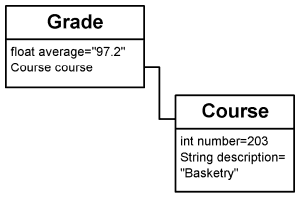
Figura 2: Un �rbol de JavaBean
El JavaBean de la clase Grade tiene dos propiedades: un float llamado "promedio", y un JavaBean de la clase Course llamado "curso". (recuerda que el valor de una propiedad JavaBean puede en s� mismo ser un JavaBean.) La clase XMLBeanWriter internamente construir� un �rbol DOM para este JavaBean que se parecer� a la figrua 3.
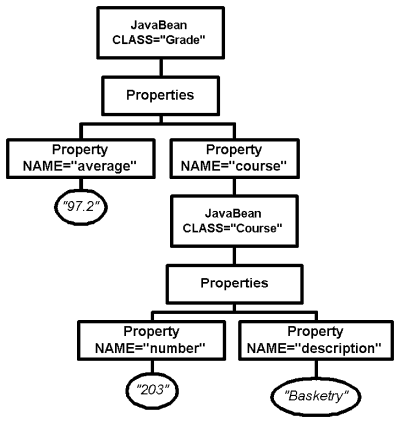
Figura 3: Un �rbol de DOM que representa nuestro JavaBean.
El XML correspondiente al �rbol de la Figura 3 aparece en la figura 4:
<JavaBean CLASS="Grade">
<Properties>
	<Property NAME="average">97.2</Property>
	<Property NAME="course">
	<JavaBean CLASS="Course">
		<Properties>
			<Property NAME="number">203</Property>
			<Property NAME="description">Basketry</Property>
		</Properties>
    	</JavaBean>
	</Property>
</Properties>
</JavaBean>
|
Figura 4: XML del �rbol DOM.
Hay tres excelentes razones para construir un �rbol y luego imprimirlo, en lugar de s�lo imprimir XML mientras analizamos el JavaBean.
- Primero, si tenemos un m�todo que convierta un JavaBean a un �rbol DOM, entonces cualquier otro programa de
Java de "cortar-y-pegar" que utilice los �rboles DOM puede utilizar nuestra clase para conseguir una representaci�n
DOM del JavaBean. Lo que hace que la clase XMLBeanWriter generalmente sea
m�s �til.
- La segunda raz�n para crear un �rbol DOM y luego imprimirlo es que las implementaciones DOM incluyen un m�todo
que imprime el �rbol DOM como XML, y as� tenemos hecho parte del trabajo.
- La tercera raz�n es que el cear un �rbol DOM nos da a nosotros algo sobre lo que escribir, y a t� te da la oportunidad de aprender a manipular documentos XML en Java.
Ahora que tenemos una idea de qu� es lo que hace el c�digo, echemos un vistazo al propio c�digo fuente. El codigo de todas las versioens de XMLBeanWriter aparece abajo en la Figura 5:
Volviendo a la tercera versi�n de writeXMLBean, observa que primero creamos un TXDocument llamado doc, como este:
TXDocument doc = new TXDocument(); |
Un TXDocument es una implementaci�n espec�fica del interface org.w3c.dom.Document (o, s�lo Document). Document es s�lo un interface definido por el W3C. No tiene ninguna implementaci�n determinada, pero ha definido el comportamiento, que resume qu� es un interface. TXDocument es una clase del paquete xml4j de IBM que implementa el interface Document. Es la ra�z del �rbol DOM del documento . El interface Document (puedes leer sobre �l en http://www.w3.org/TR/REC-DOM-Level-1/level-one-core.html#i-Document) define un API que permite que un programador agregue, suprima, e itere sobre los elementos hijos del �rbol DOM del documento.
Despu�s de haber creado el Document que vamos a imprimir, llamamos al m�todo getAsDOM(), que construye un �rbol DOM de documento bas�ndose en las propiedades del JavaBean.
309 DocumentFragment df = getAsDOM(doc, bean); 310 doc.appendChild(df); |
Aqu� hay dos cosas interesantes. La primera es que getAsDOM() devuelve un DocumentFragment, que requiere muy poca explicaci�n. �Recuerdas de antes, donde explicamos el recorte y pegado de piezas de �rboles del documento? Bien, un DocumentFragment es s�lo lo que su nombre implica: es un peque�o pedazo de un documento que se pueda agregar a la lista de hijos de cualquier Node DOM. Un DocumentFragment sea un contenedor de peso ligero que, cuando es agregado a los Nodes hijos de un DOM le da todos sus hijos a �se Node, pero no aparece como un hijo del propio Node. As� pues, en la segunda l�nea de arriba, cuando se a�ade el DocumentFragment al final de la lista de hijos del Document, el Document no tiene un hijo que sea DocumentFragment; en vez de eso, tiene cualquier hijo que tuviera el DocumentFragment. (El DocumentFragment permanece sin cambiar: "no pierde" a sus hijos Document.) Nosotros utilizamos los objetos DocumentFragment extensivamente en WriteXMLBean.
La segunda cosa interesante sobre la llamada a getAsDOM() es que estamos pasando el objeto Document al m�todo. Hacemos esto por una raz�n muy espec�fica: los �nicos objetos que se pueden agregar a un objeto Document son los objetos que el mismo Document ha creado. Observaremos que hace algunas l�neas, creamos un ejemplar de TXDocument. Esta es una implementaci�n espec�fica de un objeto DOM implementado por IBM. Los otros objetos que pueden aparecer en un �rbol DOM -- Comment, Element, Text, etc. -- tambi�n deben ser creados. En vez de las declaraciones new() por todas partes, cada de las cuales tendr�a que ser modificada si las clases que implementaban el DOM se modificaran, Document define una lista de m�todos que realizan la creaci�n de los objetos secundarios del �rbol, sobre peticiones. As� pues, si quisieramos que un objeto del nodo Text agregara alg�n nodo al �rbol DOM que est�mos construyendo, en vez de decir:
Text tx = new TXText("FiddleFaddle");
|
le pedir�amos al Document que creara uno por nosotros:
Text tx = doc.createTextNode("FiddleFaddle");
|
Los otros tipos de objetos DOM se crean de forma similar, veremos ejemplos m�s abajo.
Los m�todos create del interface Document son un excelente ejemplo del modelo de dise�o Factory, donde la creaci�n de un objeto se difiere a otro objeto. Si cambiamos a otra implementaci�n de DOM, s�lo tendremos que cambiar el new(TXDocument). Todos los otros objetos se crear�n desde la nueva clase Document.
El uso de este patr�n de dise�o de Factor�as proporciona otros beneficios que son poderosos pero se salen del �mbito de este tutorial.
La l�nea final del m�todo writeXMLBean llama al m�todo sobre el que hablamos antes, en el que el objeto TXDocument escribe su �rbol en el Writer en formato XML:
doc.printWithFormat(writer); |
Ya hemos visto el marco de trabajo , ahora veamos c�mo getAsDOM() crea un �rbol DOM.
�Anatom�a de un �rbol Bean
Hay dos versiones de getAsDOM(), la primera de las cuales aparece en la figura 5:
032 public static DocumentFragment getAsDOM(Document doc, Object bean)
		throws IntrospectionException, InstantiationException, IllegalAccessException {
033
034 	// Create the fragment we'll return.
035 	DocumentFragment dfResult = null;
036
037 	// Analyze the bean.
038 	Class classOfBean = bean.getClass();
039
040 	// If the bean knows how to encode itself in XML, then
041 	// use the DOM document it returns.
042 	try {
043		Method mgetAsDOM = classOfBean.getMethod("getAsDOM",
044		new Class[] { org.w3c.dom.Document.class } );
045		dfResult = (DocumentFragment) mgetAsDOM.invoke(bean,
046		new Object[] { doc });
047 	} catch (Exception e) { 048;; // Ignore exceptions
049 	}
050
051 	// If the bean doesn't know how to encode itself in XML,
052 	// then create a DOM document by introspecting it.
053 	if (dfResult == null) {
054		dfResult = doc.createDocumentFragment();
055		BeanInfo bi = Introspector.getBeanInfo(classOfBean);
056		PropertyDescriptor[] pds = bi.getPropertyDescriptors();
057
058		// Add an Element indicating that this is a JavaBean.
059		// The element has a single attribute, which is that Element's class.
060		Element eBean = doc.createElement("JavaBean");
061		dfResult.appendChild(eBean);
062		eBean.setAttribute("CLASS", classOfBean.getName());
063     Element eProperties = doc.createElement("Properties");
064     eBean.appendChild(eProperties);
065
066// For each property of the bean, get a DocumentFragment that
067// represents the individual property. Append that DocumentFragment
068// to the Properties element of the document
069     for (int i = 0; i < pds.length; i++) {
070         PropertyDescriptor pd = pds[i];
071         DocumentFragment df = getAsDOM(doc, bean, pd);
072         if (df != null) {
073             // Create a Property element and add to Properties element
074             Element eProperty = doc.createElement("Property");
075             eProperties.appendChild(eProperty);
076
077             // Create NAME attribute, add it to Property element,
078             // and set it to name of property
079             eProperty.setAttribute("NAME", pd.getName());
080
081             // Append the DocumentFragment to the Property element
082             // This "splices" the entire DOM representation of the
083             // Property into the tree at this point.
084             eProperty.appendChild(df);
085         }
086     }
087 }
088 return dfResult;
089 }
|
Figura 5: Primera versi�n de getAsDOM().
Lo primero que hace getAsDOM(), a excepci�n de obtener la clase Bean para su uso posterior, es controlar para ver si el bean define un m�todo llamado DocumentFragment getAsDOM(org.w3c.Document) (l�neas 42 a 49). Si es as� invoca a ese m�todo en el Bean, y selecciona el DocumentFragment resultante (el subdocumento que estamos construyendo) a lo que ese m�todo devuelve. Hace esto para permitir que un desarrollador reemplace la forma est�ndar de representar este ejemplar del objeto como XML. �ste es una convenci�n que writeXMLBean define para agregar flexibilidad.
Esencialmente, WriteXMLBean.getAsDOM() le est� "pidiendo" al JavaBean, "hey, Tu! �sabes representarte como un documento DOM?" La respuesta es "s�" si la clase del Bean define este m�todo. Esto hace a XMLBeanWriter m�s flexible. Por ejemplo, si est�mos escribiendo un JavaBean que deseamos convertir en XML, pero deseamos un cierto control sobre c�mo ese Bean se representa en XML (digamos que no te gusta como lo hemos hecho), todav�a podemos utilizar XMLBeanWriter. Simplemente definimos nuestro propio m�todo getAsDOM() en nuestra clase JavaBean, y XMLBeanWriter.getAsDOM() devuelve cualquier DocumentFragment que devolaamos. Veremos un ejemplo de esto de nuevo en la secci�n Representar como XML .
Como ejemplo, hemos modificado la clase Player.java para definir su propio getAsDOM(). Digamos que el hipot�tico Bean del jugador de baseball (en Player.java) de nuestro ejemplo de la p�gina anterior con la propiedad gradePointAverage, pero por razones de privacidad, queremos excluir este n�mero del documento DOM resultante. El c�digo aparece en la Figura 7:
024 public DocumentFragment getAsDOM(Document doc) {
025 	DocumentFragment df = doc.createDocumentFragment();
026
027 	// Create the entire document for the Bean in code.
028
029 	Element eJavaBean = doc.createElement("JavaBean");
030 	eJavaBean.setAttribute("CLASS", "Player");
031 	Comment comment = doc.createComment("XML for this Player created by Player.getAsDOM()");
032 	eJavaBean.appendChild(comment);
033 	Element eProperties = doc.createElement("Properties");
034 	eJavaBean.appendChild(eProperties);
035 	Element eProperty;
036 	eProperty = doc.createElement("Property");
037 	eProperty.setAttribute("NAME", "highSchool");
038 	eProperty.appendChild(doc.createTextNode(getHighSchool()));
039 	eProperties.appendChild(eProperty);
040 	eProperty = doc.createElement("Property");
041 	eProperty.setAttribute("NAME", "number");
042 	eProperty.appendChild(doc.createTextNode(Integer.toString(getNumber())));
043 	eProperties.appendChild(eProperty);
044 	eProperty = doc.createElement("Property");
045 	eProperty.setAttribute("NAME", "name");
046 	PersonName pnName = getName();
047 	if (pnName != null) {
048             DocumentFragment dfName = pnName.getAsDOM(doc);
049             eProperty.appendChild(dfName);
050             eProperties.appendChild(eProperty);
051 	}
052 	eProperty = doc.createElement("Property");
053 	eProperty.setAttribute("NAME", "stats");
054 	try {
055             DocumentFragment dfStats = com.javaworld.JavaBeans.XMLBeans.XMLBeanWriter.getAsDOM(doc,
                                                                    (Object)(getStats()));
056             eProperty.appendChild(dfStats);
057             eProperties.appendChild(eProperty);
058 	} catch (Exception ee) {
059             // If an exception occurs, the property is simply ignored.
060 	}
061 	df.appendChild(eJavaBean);
062 	return df;
063 }
|
Figura 7: El Bean Player.
En la figura 7, el nuevo m�todo getAsDOM() realmente construye un subdocumento DOM en el c�digo, y lo devuelve como un DocumentFragment. Observa que ignora la propiedad gradePointAverage que el mecanismo est�ndar habr�a hecho salir. Tambi�n llama a PersonName.getAsDOM(). El XML que resulta de imprimir el �rbol del documento aparece en la Figura 8 abajo. (Bean1.xml, es la entrada de esta ejecuci�n.)
<JavaBean CLASS="Player">
<!--XML for this Player created by Player.getAsDOM()-->
<Properties>
	<Property NAME="highSchool">Eaton</Property>
	<Property NAME="number">12</Property>
	<Property NAME="name">
		<!--XML for this PersonName created by PersonName.getAsDOM()-->
		First:
		Jonas, Last:
    	Grumby
	</Property>
	<Property
    	NAME="stats">
		<JavaBean CLASS="Statistics">
		<Properties>
			<Property NAME="year">1997</Property>
			<Property NAME="atBats">69</Property>
			<Property NAME="hits">30</Property>
			<Property NAME="homeRuns">2</Property>
			<Property NAME="runsBattedIn">15</Property>
			<Property NAME="runs">31</Property>
		</Properties>
		</JavaBean>
	</Property>
</Properties>
</JavaBean>
|
Observamos c�mo el comentario incluido en Player.getAsDOM() dio lugar a un comentario en la salida. Observamos tambi�n la ausencia de cualquier promedio . Esta t�cnica es de gran alcance porque le da al programador que usa el XMLBeanWriter un completo control sobre la estructura de la salida. Una forma m�s elegante de hacer esto, implicando PropertyDescriptors, aparecer� en la p�gina siguiente
Volvamos de nuevo a mirar el c�digo. Refiriendonos a la Figura 5 otra vez, las l�neas 54 a 55 hacen que el Bean consiga su objeto BeanInfo, y solicit�ndole la lista de objetos PropertyDescriptor del bean. En este punto, el programa conoce qu� propiedades va a agregar al Document.
Las l�neas 58 a 64 son nuestro primer ejemplo de creacci�n de objetos DOM y a�adirlos al �rbol:
058 // Add an Element indicating that this is a JavaBean.
059 // The element has a single attribute, which is that Element's class.
060 Element eBean = doc.createElement("JavaBean");
061 dfResult.appendChild(eBean);
062 eBean.setAttribute("CLASS", classOfBean.getName());
063 Element eProperties = doc.createElement("Properties");
064 eBean.appendChild(eProperties);
|
La l�nea 60 crea un elemento que se parece a <JavaBean> en XML. La siguiente l�nea (61) la agrega al �rbol resultante. Entonces el m�todo fija el atributo CLASS del elemento JavaBean al nombre de la clase del Bean (l�nea 62), as� que el XML que resulta parecer�a <JavaBean CLASS="classname">. Las dos l�neas siguientes (63 a 64) crean un elemento <Properties> y lo a�aden al elemento <JavaBean>. En este punto, el �rbol se parece a esto:
<JavaBean CLASS="classname"> <Properties> </Properties> </JavaBean> |
Por supuesto, el documento "realmente" no se parece a esto, En realidad, esto s�lo una estructura de datos. El XML de arriba es lo que ver�amos si imprimieramos el fragmento de documento en este punto.
El bucle de la parte inferior del m�todo (l�neas 69-86) itera sobre la lista de descriptores de propiedades, y por cada propiedad:
- obtiene el XML de cada propiedad llamando al m�todo getAsDOM() sobrecargado
para propiedades.
- crea un elemento <Property> para la propiedad.
- Fija el atributo NAME del elemento <Property>
al nombre de la propiedad.
- A�ade la estructura DOM de la propiedad al elemento <Property>.
- A�ade el nuevo elemento <Property> al elemento <Properties>.
La estructura resultante es la representaci�n DOM del JavaBean. Ahora todo lo que nos falta es entender c�mo se representa una propiedad como XML.
�Representar propiedades como XML
El c�digo para la segunda versi�n de getAsDOM() aparece en la figura 9. Este m�todo genera el XML para la propiedad JavaBean indicada por el tercer argumento del m�todo, un PropertyDescriptor. Este m�todo podr�a devolver null, para indicar que no puede imaginarse c�mo representar la propiedad como XML.
102public static DocumentFragment getAsDOM(Document doc, Object bean, PropertyDescriptor pd)
103  	    throws IntrospectionException, InstantiationException, IllegalAccessException {
104 	Class classOfBean = bean.getClass();
105 	Class classOfProperty = pd.getPropertyType();
106 	DocumentFragment dfResult = null;
107 	String sValueAsText = null;
108 	Class[] paramsNone = {};
109 	Object[] argsNone = {};
110
111 	// If the property is "class", and the type is java.lang.class, then
112 	// this is the class of the bean, which we've already encoded.
113 	// So, in this special case, return null.
114 	if (pd.getName().equals("class") && classOfProperty.equals(java.lang.Class.class)) {
115         return null;
116 	}
117
118 	// 1. Try to represent the property as XML.
119 	// This bean may know how to describe itself, or parts of
120 	// itself, as XML. There are two possibilities:
121 	// [a] The bean has a method called get<Propname>AsXML()
122 	// [b] The property class has a method called getAsDOM()
123 	// We'll try both of these, and the first (if any) that
124 	// works will be the DocumentFragment we want to return.
125 	// If none of these are true, then we try to find the object's
126 	// value as text.
127
128 	// [1a] Does the bean have a method called get<Propname>AsXML()?
129 	// Capitalize property name.
130 	StringBuffer sPropname = new StringBuffer(pd.getName());
131 	char c = sPropname.charAt(0);
132 	if (c >= 'a' && c <= 'z') {
133             c += 'A' - 'a';
134 	}
135 	sPropname.setCharAt(0, c);
136 	String sXMLGetterName = "get" + sPropname + "AsXML";
137
138 	// If both of these methods succeed, then dfResult will be set
139 	// to non-null; that is, the method existed and returned a
140 	// DocumentFragment.
141 	try {
142             Class [] params = { org.w3c.dom.Document.class };
143             Method mXMLGetter = classOfBean.getMethod(sXMLGetterName, params);
144             Object[] args = { doc };
145             dfResult = (DocumentFragment) (mXMLGetter.invoke(bean, args));
146 	} catch (Exception ee) {
147            ;// Ignore... couldn't get the method
148 	}
149
150 	// Hereafter, we're trying to create a representation of the property
151 	// based somehow on the property's value.
152 	// The very first thing we need to do is get the value of the
153 	// property as an object. If we can't do that, we can get no
154 	// representation of the property at all.
155 	Object oPropertyValue = null;
156 	try {
157             Method getter = pd.getReadMethod();
158             if (getter != null) {
159                 oPropertyValue = getter.invoke(bean, argsNone);
160             }
161         } catch (InvocationTargetException ex) {
162             ; // Couldn't get value. Probably should be an error.
163  	}
164
165 	// [1b] If we don't have a DocumentFragment, the previous block failed.
166 	// So, let's find out if the property's class has a method called
167 	// getAsDOM() and, if it does, call that instead.
168 	if (dfResult == null) {
169             try {
170                 Class [] params = { org.w3c.dom.Document.class };
171                 Method mXMLGetter = classOfProperty.getMethod("getAsDOM", params);
172                 Object[] args = { doc };
173                dfResult = (DocumentFragment) (mXMLGetter.invoke(oPropertyValue, args));
174             } catch (Exception ee) {
175                 ; // Ignore -- who cares why it failed?
176             }
177      	}
178
179
180 	// 2. Try to represent the property as a String.
181 	// See if this property's value
182 	// is something we can represent as Text, or if it's something
183 	// that must be represented as a JavaBean. Let's assume that this
184 	// object can be represented as text if:
185 	// [a] it has a PropertyEditor associated with it, because
186 	// PropertyEditors always have setAsText() and getAsText().
187 	// If it can't be represented as text, then we pass it to
188 	// getAsDOM(Document, Object) and return the result.
189
190 	if (dfResult == null) {
191
192             // [2a] Can we get either a custom or built-in property editor?
193             // If the PropertyDescriptor returns an editor class, we
194             // create an instance of it; otherwise, we ask the system for
195             // a default editor for that class.
196             Class pedClass = pd.getPropertyEditorClass();
197             PropertyEditor propEditor = null;
198             if (pedClass != null) {
199                 propEditor = (PropertyEditor) (pedClass.newInstance());
200             } else {
201                 propEditor = PropertyEditorManager.findEditor(classOfProperty);
202             }
203
204             // If the property editor's not null, pass the property's
205             // value to the PropertyEditor, and then ask the PropertyEditor
206             // for a text representation of the object.
207             if (propEditor != null) {
208                 propEditor.setValue(oPropertyValue);
209                 sValueAsText = propEditor.getAsText();
210             }
211
212             // If somewhere above we found a string value, then create
213             // a DocumentFragment to return, and append to it
214             // a Text element.
215             if (sValueAsText != null) {
216                 dfResult = doc.createDocumentFragment();
217                 Text textValue = doc.createTextNode(sValueAsText);
218                 dfResult.appendChild(textValue);
219             }
220  	}
221
222  	// 3. Try to represent the property value as a JavaBean.
223 	// If we don't have a DocumentFragment yet, we'll
224 	// have to introspect the value of the object, because
225 	// it's apparently something that can't be represented
226 	// as flat text. We'll assume it's a JavaBean.
227 	// If it isn't... oh, well.
228 	//
229 	if (dfResult == null) {
230  	    dfResult = getAsDOM(doc, oPropertyValue);
231 	}
232 	return dfResult;
233    }
|
Figura 9: Segunda versi�n de GetAsDOM().
Vayamos a trav�s de esta segunda versi�n del m�todo getAsDOM() y veamos que hace:
- Chequea para ver si la propiedad es la Clase del Bean --
Lo primero que hace getAsDOM() (l�neas 114 - 116) es chequear si el nombre de la propiedad es class y el tipo de la propiedad es java.lang.Class, y si as�, devuelve null. Esto es porque el Introspector (a menos que el BeanInfo diga lo contrario) observa que el JavaBean tiene un m�todo llamado getClass() que devuevle un Class. Por eso, por definici�n, trata la clase del objeto como una propiedad. Para la mayor�a de los Beans, se le pedir� a este m�todo que cree XML para la clase del objeto. Esto no es una propiedad v�lida para nuestros prop�sitos (nos ocupamos de la clase de la propiedad pregunt�ndole la M�quina Virtual Java (JVM) sobre ella, no ley�ndolo desde el XML), as� que decimos al llamador que ignore esta propiedad devolviendo null. - Chequea para ver si el Bean proporciona XML personalizado para una propiedad --
Las siguientes l�neas (130 a 136) controlan para ver si el Bean tiene un m�todo llamado getPropertynameAsDOM(). Esta es la comprobaci�n que mencionamos arriba para el getAsDOM(), excepto que comprueban una propiedad individual en vez de un Bean entero. Buscando un m�todo con un nombre particular, de esta forma define una convenci�n de nombramdo que XMLBeanWriter utiliza para hacer la programaci�n f�cil y flexible. Si un Bean tiene una propiedad Price, por ejemplo, un programador puede definir int getPrice() y void setPrice(int price) normalmente, pero despu�s tambi�n define getPriceAsDOM(), y devuelve un fragmento DOM arbitrariamente complejo cuando este pedazo de c�digo lo solicita. Hemos creado un nuevo tipo de accesor de propiedades, que consigue una propiedad no como valor, sino como un �rbol DOM. Por supuesto, necesitamos modificar XMLBeanReader para manejar un accesor de setPropertynameAsDOM. Lo abordaremos en la p�gina siguiente. - Obtener el valor de propiedad --
Si el Bean no define a un accesor para la propiedad como XML (llam�moslo "un accesor de propiedad XML"), entonces tendremos que imagirnarnos c�mo representarlo nosotros mismos. En la Figura 9, las l�neas 157 a 159 utilizan el m�todo getter de la propiedad (que vino de PropertyDescriptor) para conseguir el valor de propiedad (en el Bean que estamos procesando) como un java.lang.Object. De aqu� en adelante, cualquier representaci�n de esta propiedad debe depender de tener un valor de propiedad -- porque de otra forma, �qu� est�mos formateando? - Ver si la clase de la propiedad sabe representarse como XML --
La l�neas 130 a 148 piden al PropertyDescriptor la clase de la propiedad, y entonces utilizan la reflexi�n para determinar si la clase de la propiedad define el m�todo getAsDOM(). En la primera versi�n de getAsDOM() (Figura 5, el que obtiene el fragmento DOM para un Bean, en vez de una propiedad), buscamos un m�todo getAsDOM() en la clase del Bean; aqu�, estamos buscando uno en la clase de la propiedad. Como ejemplo de esto, agregu�mos un m�todo getAsDOM() al PersonName.java de la p�gina anterior. Ahora, cuando un Player se est� convirtiendo a XML, esta versi�n de getAsDOM() detecta que existe PersonName.getAsDOM(), y utiliza lo que ese m�todo devuelve como la representaci�n del name de la propiedad. Podemos ver los resultados de esta substituci�n en los comentarios y el formato del objeto PersonName en la Figura 8. - Intentar representar la propiedad como un Strring usando el PropertyEditor para la propiedad --
Las l�neas 190 a 220 intentan obtener una representaci�n String cadena de la propiedad. La idea aqu� es representar la propiedad como un s�lo String, que se puede a�adir al final del elemento <Property> como un nodo Text. El PropertyEditor para una propiedad, encontrado en el PropertyDescriptor, tiene m�todos para fijar y obtener la propiedad como texto. Esto significa que podemos utilizar el PropertyEditor para convertir el objeto a y desde un String. As� pues, pedimos al PropertyDescriptor un PropertyEditor, y si esto no funciona, le pedimos al sistema (mediante un PropertyEditorManager) un editor por defecto para el tipo de la propiedad. Si conseguimos un editor de la propiedad de cualquiera de estas dos maneras, fijamos su valor (PropertyEditor.setValue()) al valor de la propiedad, y despu�s conseguimos su valor como texto. Si todo esto tiene �xito, las l�neas 215 a 219 crear�n un nodo Text con el valor del texto de la propiedad dentro, y devuelven eso como la representaci�n DOM de la propiedad. - Intentar representar la propiedad como un JavaBean --
Si todos los otros m�todos fallan, nosotros asumimos que el objeto devuelto es un JavaBean. Llamamos recursivamente a la primera versi�n de getAsDOM() sobre el valor de propiedad y esperamos por el mejor. Observa que no hay garant�a de que cualquier clase sea un Bean. Lo que esto significa, si est�mos definiendo propiedades que devuelven tipos no-primitivos, y no tenemos editor de propiedades y y no queremos que esas propiedades se pierdan, tendremos que definir un getAsDOM() para la propiedad, getPropertynameAsDOM() para la propiedad, o getAsDOM() para todo el Bean. Sin embargo, si la propiedad es un Bean, estas �ltimas l�neas (l�neas 229 a 231) crean correctamente el documento DOM para la propiedad, que entonces (como recordamos de la discusi�n de TXDocument arriba) se utiliza para escribir el XML al fichero de salida. Ya est�!!!
�Conclusi�n
En esta p�gina, hemos creado una clase que convierte un JavaBean en XML. En la siguiente p�gina, miraremos (y corregiremos) algunos de los problemas que nuestro nuevo c�digo causar� en XMLBeanReader.